I plugged in my new MSI 491CQPX, a QD-OLED ultrawide, and the first thing I noticed was that text looked dirty: every letter bordered by a red fringe on one side, a green one on the other. Not blurry, but colored — as if my glasses had chromatic aberration.
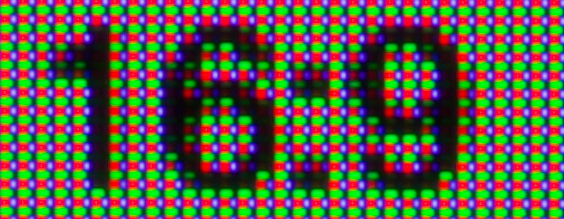
That is subpixel color fringing. QD-OLED panels arrange their red, green, and blue subpixels in a triangle, while font rendering engines — ClearType, FreeType, all of them — assume the classic RGB stripes of LCD panels. Subpixel antialiasing is the culprit: it lights up individual subpixels to fake a higher resolution, and on a triangular layout the colors bleed sideways into a fringe.
PC Monitors has the full story, with macro photos (QD-OLED and WOLED both suffer). nuxx was so bothered that he returned his OLED — it made his eyes feel funny. I did not return mine: on Linux the fix is one setting.
The fix: grayscale antialiasing🔗
Subpixel rendering is the problem, so I stopped using it. Set your fonts to plain grayscale antialiasing and the fringes disappear. On GNOME:
- Install GNOME Tweaks:
sudo apt install gnome-tweaks - Open Tweaks → Fonts
- Set Antialiasing to Grayscale — this is the whole fix
The letters lose a bit of the LCD-crisp sharpness, but I had to look hard to tell the difference. Hinting is a matter of taste, not part of the fix: I left it alone.
Not on GNOME?🔗
Any desktop works — the switch is in fontconfig, the config file every Linux font stack reads. Create ~/.config/fontconfig/fonts.conf with this:
<?xml version="1.0"?>
<!DOCTYPE fontconfig SYSTEM "fonts.dtd">
<fontconfig>
  <match target="font">
    <edit name="rgba" mode="assign"><const>none</const></edit>
  </match>
</fontconfig>
run fc-cache -f, log out and back in. Setting rgba to none is precisely what turns subpixel rendering off.
Black is too black🔗
The fringes are most visible at maximum contrast — white text on pure black. I keep my editor and terminal backgrounds at a very dark gray (#121212) instead of #000000, which calms things down further and looks just as "OLED" to me.
Do not try the ClearType Tuner under Wine🔗
Tempting, I know, but do not. The tuner writes Windows registry keys (Software\Microsoft\Avalon.Graphics), which FreeType and Wayland never read — zero effect. And on Windows it would not help either: the tuner cannot adapt ClearType to a triangular layout, which is why there is a long-running PowerToys issue begging Microsoft for OLED subpixel support.
Alas, the Linux advantage here is real: Windows users are still waiting for Microsoft, while I fixed my monitor with one toggle. Done.
... But still annoyed by the pixel refresh🔗
However, I still have to cope with the other trouble with OLED monitors: They just stop working for 10 minutes at least once a day... at the most inconvenmient times: the dreaded pixel refresh.