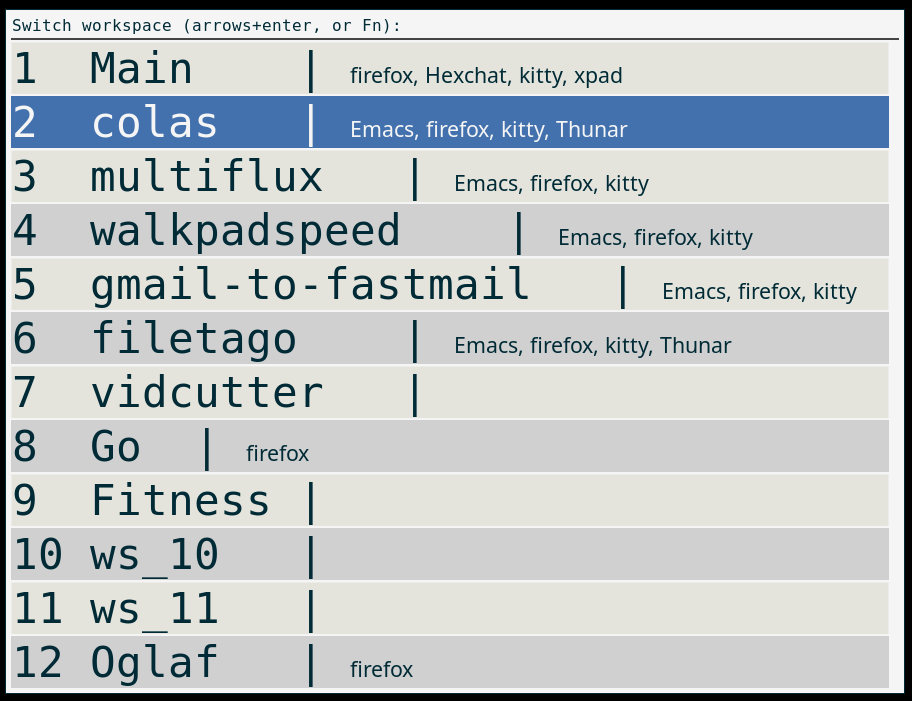
I switch workspaces dozens of times a day — browser here, terminal there, editor somewhere else — and I could not find a workspace switcher that was convenient. Either they were tiny unreadable icons in a panel, or huge fancy views. I just wanted a readable list of names, plus an easy way to rename the workspace via the programs that run in them.
So I added x-workspace-switcher to my colas-bash-lib, a single bash script in bin/.
Switching🔗
Run it with no argument and a rofi menu pops up, listing each workspace with the classes of the windows currently on it:
1  ws_1 | firefox, discord
2  ws_2 | kitty, vim
So I can see at a glance where everything is, instead of remembering. The current workspace is pre-selected. Move with the arrows or incremental search, hit Enter — or just hit the function key of the workspace you want: F6 goes straight to workspace 6.
Note: I use F6 to go to workspace 6 instead of just 6 to not mess with typing 6 during an incremental search. Also I use Super-F6 as a keyboard shortcut to go to Workspace 6, and using functions keys allow for 12 workspaces (or 14 on my NZXT keyboard :-)
Renaming🔗
x-workspace-switcher new-name renames the current workspace.
That turned out to be the interesting part: there is no standard way to rename a workspace on X11. For instance, I have a script that I run in a git repository that sets up my development environment for it (emacs, kittyies, opencode, ...) and now also name the workspace with the repository name.
Why renaming needs per-WM code🔗
Each window manager does it its own way:
- Xfce:
xfconf-queryon/general/workspace_names - i3:
i3-msg "rename workspace to ..." - bspwm:
bspc desktop -n - GNOME:
gsettingsonworkspace-names - KDE:
kwriteconfigplus aqdbusreconfigure - anything else: a python-xlib fallback that rewrites the
_NET_DESKTOP_NAMESproperty directly
Detection is via wmctrl -m, helped by XDG_CURRENT_DESKTOP when the WM name is ambiguous.
The Wayland question🔗
As always with Wayland: alas, no. The core protocol has no workspace support, and each compositor invents its own incompatible API. My switcher is X11 only — save your sanity, use X11. :-)
Installation, Usage, and more info🔗
See the colas-bash-lib repository, the script is bin/x-workspace-switcher. It needs rofi; renaming on some WMs needs extra packages (i3-wm bspwm plasma-workspace python3-xlib).
Just copy the script in your PATH (/usr/local/bin, ~/.local/bin/, ...), and bind it to a keyboard shortcut for convenience. For instance I bound it to Super-W (aka Windows-W) since I bound all my window and workspace management function to Super shortcuts.
License🔗
© Colas Nahaboo, 2026. MIT License. Do what you want with it. 